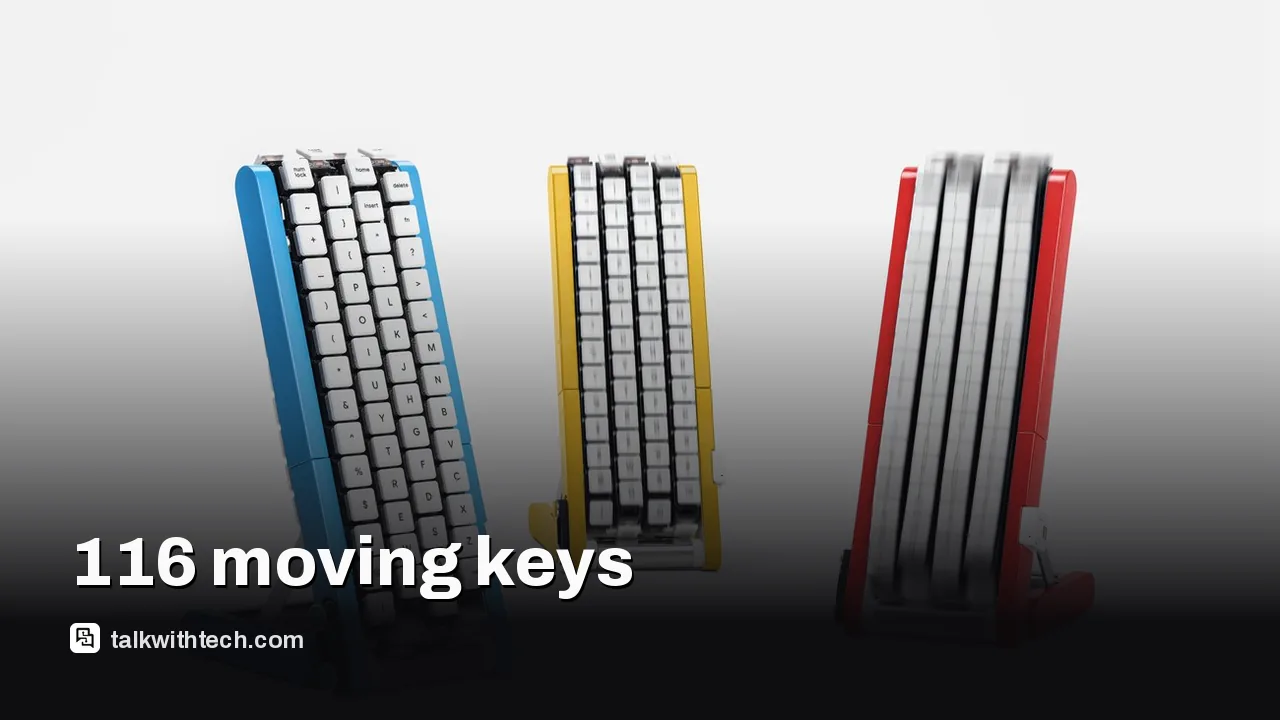
Google Japan's Gboard team unveiled the Gboard Conveyor Belt Version, with 116 keys on four moving belts.
You wait for the letter you want to roll under your finger, then tap it, so one hand stays free.
Google won't sell it, but the design files are open source on GitHub under an Apache 2.0 license.
It is the 15th entry in a long-running series of deliberately odd but working Gboard keyboards.
Quick read · 1 min
Google Japan's Gboard team has built a keyboard where the keys come to you. The Gboard Conveyor Belt Version puts 116 keys on four moving belts, 29 per belt, and you tap each letter as it passes under your finger. Capitals get their own keys, so there's no need for Shift.
It's pitched at one-handed or one-finger typing, leaving your other hand free for a mouse or a cup of tea. Mistakes are slow to fix, though, because you must wait for Backspace to roll around.
Google won't sell it.
Design files are free on GitHub under an Apache 2.0 license.
Only the Moving Keys edition is documented; the Bluetooth typing edition is coming soon.
It's the 15th in Google Japan's run of odd but working keyboards, released each October 1 for Keyboard Day.
Most keyboards make your fingers do the traveling. Google Japan’s newest one makes the keys come to you. The Gboard team has built the Gboard Conveyor Belt Version, a working desktop keyboard with 116 keys mounted on four looping belts that scroll past a waiting fingertip, so you tap each letter as it rolls into place.
It sounds like a joke, and partly it is. But it’s a real, functioning device, Google has published everything you need to build one, and it touches a genuine problem: standard keyboards assume you have two free hands. For anyone typing one-handed, whether because of a disability, an injury or simply a mouse in the other hand, that assumption costs time. So does the rolling keyboard actually help? The honest answer comes down to timing.
01
How the Google rolling keyboard works
Each of the four belts carries 29 keys, which adds up to 116. The belts run continuously, and you press the character you want when it passes under your finger. Your hand barely moves.
One clever detail: uppercase and lowercase letters have their own separate keys. That means you never need to hold Shift to type a capital, which matters a lot when you’re only using one finger. Google says this makes the design intuitive.
The catch is obvious once you picture it. If you hit the wrong letter, you have to wait for Backspace to come around again. Several reviewers compared using it to a rhythm game, where the challenge is hitting the right key at exactly the right moment.
Its Japanese name is the Gboard kurukuru version. Kurukuru roughly means “round and round”, with a play on kuru, a word that means to come or arrive.
02
Why Google Japan built a keyboard that moves
Google’s pitch starts from a fair point. A normal keyboard is laid out for a pair of hands. Use just one, or a lone finger, and you end up dragging your whole arm back and forth across the keys.
Its solution is to reverse the relationship. In its Japanese announcement, Google says, in translation, that the keyboard should be the one that moves, and calls the idea a “Copernican turn” that puts the typist at the center of text input.
The blog’s own examples are playful: type with one hand while sipping tea, or keep the other hand on your mouse. It even suggests a second unit for two-handed typing, which brings things neatly back to where keyboards started. The team also floats possible future versions, including a high-speed mode, a voice guide that reads out keys as they pass, longer and shorter models, and a compact version for mobile devices.
03
Can you buy the Gboard Conveyor Belt Version?
No. Google has no plans to sell it. Instead, it has released the design on GitHub under an Apache 2.0 license, a permissive open-source license that lets anyone use and modify the files.
The project includes 3D-printable files for the case and belt mechanisms, KiCad schematics (KiCad is free software for designing electronics), circuit board layouts, firmware and a build guide.
There’s a limit, though. Only the motorized Moving Keys edition is fully documented. The edition that can actually type over Bluetooth, and its board files, are still marked as coming soon, with no date. So for now, a home build gets you the moving mechanism, not a keyboard you can plug into your laptop and use.
Even the documented version is a serious project. You’ll need a 3D printer, circuit boards made, soldering skills and plenty of patience.
04
The 15th keyboard in Google Japan’s strangest tradition
The conveyor belt is the 15th entry in Google Japan’s series of unusual keyboard ideas. It was released on October 1, which the team treats as Keyboard Day because the date, written 10/1, echoes the standard 101-key layout.
The series began as April Fools’ gags. One account traces it to a drum-kit input system from April 1, 2010, while another points to a single-key Morse code keyboard in 2012 as the start of the current run. After a pause in 2020, it returned on October 1, 2021, and has stayed on that date since. Asked why the team dropped April Fools’ Day, a spokesperson told a Japanese tech site, in translation, that it was because they realized they weren’t actually lying.
Past entries include a Teacup keyboard, a Bar version with every key in one long row, a CAPS version worn on the head, a Double-Sided Gboard with 208 keys across 26 linked modules, and last year’s rotary dial keyboard modeled on old telephones.
What a rolling keyboard means for one-handed typists
For everyday users, this won’t replace the keyboard on your desk or phone. Typing a long email by waiting for each letter to roll past would be slow, and mistakes are painful to fix.
But the idea behind it is worth taking seriously. Many people type with one hand for at least part of their lives, after a broken wrist, during a long-term disability, or while holding a baby. Mainstream keyboards do very little for them. Ideas like separate capital keys and a keyboard that brings letters to a fixed point are the sort of experiments that can feed into future accessibility tools, even if this exact device never leaves a maker’s workbench.
If you’re a hobbyist, the GitHub files are a free, detailed lesson in moving mechanisms and keyboard electronics. If you just want a laugh, Google Japan’s introduction video shows the belts in action.
06
Quick answers
What is the Google rolling keyboard?
It’s the Gboard Conveyor Belt Version from Google Japan: a working keyboard with 116 keys on four belts that move past your finger so you can type with one hand.
Can I build Google’s conveyor belt keyboard?
Yes, if you’re handy. The files are free on GitHub, but only the Moving Keys edition is documented, and the Bluetooth typing edition is still coming soon.
Is it an April Fools’ joke?
It’s playful, but it isn’t an April Fools’ prank. It was released on October 1 and the device really works.
Mistral's trillion-parameter Le Chonk is now free to download, but even the slimmed-down version needs four data-center GPUs. Here's the realistic way to try it.
OpenAI's boss told Stanford business students their career instincts are stuck in the past. What he actually said, and what holds up for everyone else.
Google's newest model tops a major AI ranking, but security defenders get it before anyone else. Here is the rollout order, the price and how it stacks up.
5 min read
We use cookies to understand how readers use Talk With Tech, so we can make it better. Is that OK? Privacy policy
The Daily Brief
Today's biggest tech stories, in 5 minutes
Every morning, the news that matters from AI, phones, apps and the people shaping tech. Explained in plain English. Free.
One email a day. No spam, unsubscribe anytime. Privacy policy