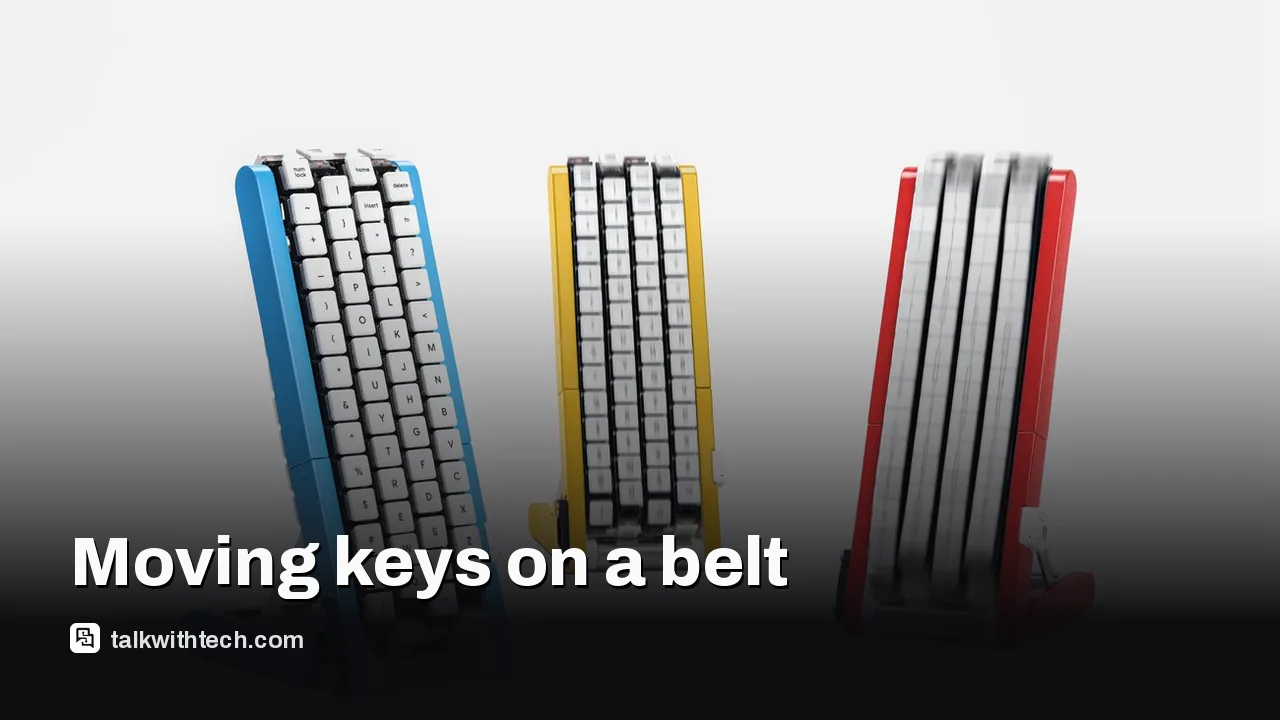
Google Japan built a conveyor belt keyboard and shared the plans
The Gboard conveyor belt version carries 116 keys past your finger on four moving belts. You can't buy it, but the 3D-print files and build guide are free on GitHub.
Google Japan's new Gboard conveyor belt version uses four moving belts with 29 keys each, 116 keys in all.
It was revealed on October 1, Google Japan's Keyboard Day, a nod to the standard 101-key layout.
It's a gag and won't be sold, but Google published the design files and a build guide on GitHub.
The guide covers a motorized model; a Bluetooth model described as able to type is still to come.
Quick read · 1 min
Google Japan has built a keyboard where the keys come to you. The Gboard conveyor belt version carries 116 keys on four motorized belts, and you tap each letter as it passes under your finger. It's pitched, tongue firmly in cheek, as a fix for one-handed typing.
It was unveiled on October 1, which Google Japan calls Keyboard Day because 10/1 echoes the 101-key layout. It's the 15th gag keyboard in a series that began as April Fools' jokes.
It won't be sold.
Design files, firmware and a build guide are free on GitHub.
A Bluetooth model that can type is still to come.
Building one means printing well over a hundred parts and fitting 116 switches, so it's a project for patient makers.
Most keyboards wait for your fingers. Google Japan’s newest one makes the keys come to you. The Gboard conveyor belt version carries 116 keys around four motorized belts, and you type by tapping each key at the moment it rolls under your finger.
It is, of course, a joke. But it’s a working joke, and anyone with a 3D printer and plenty of patience can build one, because Google has published the plans for free. If you’ve ever wondered what Google Japan does every year with its strange keyboards, this is the latest chapter in a long-running tradition, and the first one many people outside Japan have heard about.
01
How the conveyor belt keyboard works
The design stacks four conveyor belts, each carrying 29 keys, for 116 keys in total. That’s more than a standard keyboard, partly because uppercase and lowercase letters have their own separate keys, so you never need to hold Shift. A motor turns the belts, and you wait for the letter you want to arrive, then press it.
Google Japan pitches it with a perfectly straight face as a breakthrough for one-handed or one-finger typing. Normal keyboards assume two hands, so typing with one means moving your arm and palm a lot. The solution, the team says, is for the keyboard to do the moving instead. That leaves your other hand free for a mouse, a cup of tea or, as the team suggests, a second conveyor belt keyboard.
The joke has a sting in its tail. Make a typo and you have to wait for the Backspace key to come back around.
02
Why Google Japan launches keyboards on October 1
The release date is part of the gag. Google Japan calls October 1 “Keyboard Day” because 10/1 echoes the common 101-key keyboard layout. Each year on that date, the team unveils a fully working answer to a problem nobody had.
The series started as April Fools’ jokes. The GitHub project that hosts the designs still describes them as previously known as the Gboard April Fools keyboards. Accounts differ on exactly when the switch to October happened, but the conveyor belt version is officially billed as the 15th entry in the series.
The ideas have stayed consistently odd. Past entries include a drum kit you play to type, a single-key Morse code keyboard, a keyboard you control by bending a metal spoon, a teacup with keys around the outside, a giant keycap-shaped hat you rotate on your head, a single long bar of keys in alphabetical order, a Möbius-strip keyboard with keys on both sides, and last year’s rotary phone dial. One joke even came true: years after the Morse code gag, Google really did add Morse code input to Gboard on Android.
03
Can you buy it, or build your own?
You can’t buy one. Google says there are no plans to sell it, and the project page states plainly that it isn’t an official Google product. What you can do is build it. Google released the design as open source on GitHub, including:
3D-printable part files for the frame, rollers and belt links
Firmware source code
Circuit board files
A step-by-step build guide, with a Japanese version
Be ready for a long project. The build guide lists 157 printed parts, although one early review of the parts list counted 154, and 116 of them are the small links that make up the belts. Each of those links gets its own key switch and keycap. You’ll also need a 3D printer, a way to press heat-set nuts into plastic, and patience for six assembly stages.
04
The catches if you want to build one now
The published guide covers a motorized model whose belts turn and carry the keys around. A second version that connects over Bluetooth, which the guide describes as the model that can actually enter text, is listed as coming later. The guide doesn’t clearly say whether the motorized model can type into a computer.
Some documentation was also marked as still to come at launch, including the circuit and electronics notes, and the motor’s 150 RPM rating is about the only clue to how fast the keys move. If you want a working typist’s tool rather than a showpiece, it may be worth waiting for the Bluetooth model and fuller instructions.
Google Japan also has a list of tongue-in-cheek future upgrades “under consideration”: a high-speed mode, color options, a longer version for more characters and a shorter one for travel.
Nothing about the Gboard app on your phone changes. These keyboards exist to draw attention to Gboard, Google’s keyboard app, and to Japanese text input, a tricky problem because Japanese uses thousands of characters that don’t fit a normal layout.
Still, the series shows a side of Google that rarely gets attention now: engineers spending real time on beautifully built nonsense, then giving away the blueprints. For makers and students, the GitHub files are a genuine learning project in motors, firmware and 3D printing. And if you just want to type, Google’s own project page points you to the regular Gboard, the one where the keys stay put.
06
Quick answers
Is the Google Japan conveyor belt keyboard real?
Yes, it physically works, but it’s a gag project. Google won’t sell it.
Where can I get the plans?
Google published the design files, firmware and build guide as open source on GitHub, in its mozc-devices repository.
How many keys does it have?
116 keys, spread across four belts of 29 keys each.
T-Mobile's boss says there is no room for SpaceX to rent its network. Your satellite texting stays, but the fight for your phone bill just got sharper.
Apple's latest iPhone update closes security holes that could let attackers run code on your phone, and adds Siri memory. A few changes may still annoy you.
Apple finally sells its long-promised memory upgrade, and the memory alone now costs more than a fully loaded Mac Studio used to. Every price step, and a cheaper route.
5 min read
We use cookies to understand how readers use Talk With Tech, so we can make it better. Is that OK? Privacy policy
The Daily Brief
Today's biggest tech stories, in 5 minutes
Every morning, the news that matters from AI, phones, apps and the people shaping tech. Explained in plain English. Free.
One email a day. No spam, unsubscribe anytime. Privacy policy