HiLight is a color light in the camera bar of the Pixel 11 Pro, Pro XL and Pro Fold; the regular Pixel 11 lacks it.
The November Pixel Drop lets HiLight glow when a favorite contact texts you in Google Messages.
Google's Shenaz Zack confirmed on X that WhatsApp messages now trigger the light too, on top of WhatsApp calls.
It only glows with the phone face down on a flat surface, and only for contacts you've marked as favorites.
Quick read · 2 min
HiLight is the color light in the camera bar of the Pixel 11 Pro, Pro XL and Pro Fold. At launch it only glowed for calls from favorite contacts and while Gemini was talking. The November Pixel Drop added Google Messages texts, and Google's Shenaz Zack has since confirmed on X that WhatsApp messages trigger it too.
To use it, update your phone, check Settings, System, HiLight, star the contact in your Contacts app and choose their color. Then lay the phone face down on a flat surface. There's no extra WhatsApp switch; the light appears to reuse your favorites and colors.
Flash notifications stop HiLight from glowing for calls.
Only starred contacts trigger it.
Signal, Telegram and other apps aren't supported yet.
The update rolls out in stages, so give it a few days if the new message option hasn't reached your phone.
Your Pixel 11 Pro can now tell you who’s texting without you flipping it over. HiLight, the color light hidden in the phone’s camera bar, used to react only to calls and Gemini. Since the November Pixel Drop it also glows for Google Messages texts, and Google has now confirmed WhatsApp messages work as well. If you’ve been wondering how to use Pixel HiLight for something genuinely handy, this is the moment it starts to earn its place.
The short version: star a contact, give them a color, and leave the phone face down. That’s the whole trick. The catch is in the details. Only three phones have the light, only favorites trigger it, and one common accessibility setting quietly switches it off for calls. Below is the full setup, plus the fixes when the glow refuses to show up.
01
What is Pixel HiLight, and which phones have it?
HiLight is a small LED built into the camera island on the back of the Pixel 11 Pro, the Pixel 11 Pro XL and the Pixel 11 Pro Fold. The standard Pixel 11 doesn’t have one. The light can shine in different colors, and it also does double duty as a fairly dim camera flash.
It took the spot of the temperature sensor that Google first put on the Pixel 8 Pro. Some owners still miss that sensor, which tells you how underwhelming HiLight felt when these phones launched. Think of it as a modern take on the blinking notification LED that BlackBerry phones and early Android handsets made famous, except it only talks when you’ve told it who matters.
At launch it did just two jobs:
Calls from favorites. It glowed in a color you chose when a starred contact rang, through the Phone by Google app or WhatsApp.
Gemini. It pulsed in a swirl of colors while the assistant was listening and answering with the phone face down.
Reviewers were not kind. One called it the bare minimum, and one Reddit thread called it close to useless. Google said at the time that more uses were in the works. The November update is the first real delivery on that promise.
02
How to use Pixel HiLight: setup in five steps
Setting up HiLight is quick once your phone has the latest software. HiLight is switched on by default, so most of the work is choosing your people.
Install the November Pixel Drop. Look for the system update in Settings. The new message support arrives with Android 17 QPR2, and Google is rolling the update out in stages over several weeks, so it may not appear on day one.
Check the main switch. Go to Settings, then System, then HiLight. This is where the feature’s overall controls live, and where you can confirm it hasn’t been turned off.
Mark the person as a favorite. Open the Contacts app and star the contact. HiLight ignores everyone who isn’t a favorite, by design.
Pick their color. Still in Contacts, open that favorite’s card and choose the light color for them. Give your partner one shade and a parent another, and you’ll know who it is from across the room.
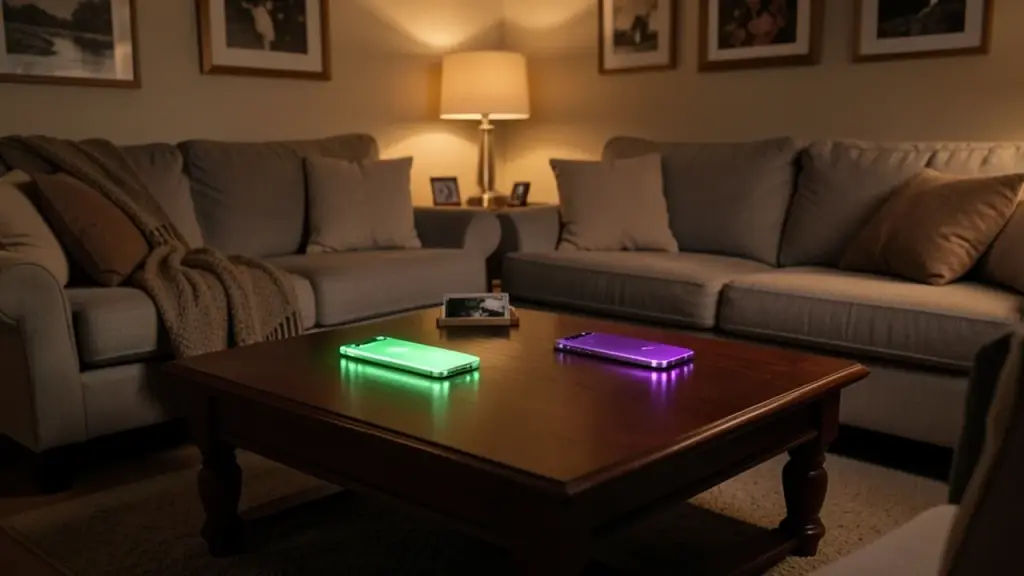
Put the phone face down. HiLight only shines when the phone lies screen down on a flat surface. Propped up, in your hand or in a pocket, it stays dark.
That’s it for calls and Google Messages. When a favorite rings or sends a text, the camera bar lights up in their color.
03
Getting WhatsApp messages to light it up
WhatsApp support is the newest piece, and it arrived almost by surprise. Google’s Pixel Drop notes mentioned only Google Messages. Then, on November 13, Shenaz Zack, who leads product management for Pixel at Google, posted a short video on X confirming WhatsApp texts now trigger the light, adding that favorites now get VIP treatment.
There’s no separate WhatsApp switch to find. Google hasn’t announced a new control, and early testers say none appeared. Based on how WhatsApp calls already behaved, the light seems to reuse the same favorites and colors you set in Contacts. In practice that means:
The sender needs to be a starred favorite in your Contacts app.
That contact’s phone number should be the one tied to their WhatsApp account, so the phone can match the two.
You need the same November update that brought Google Messages support.
Google hasn’t spelled out the matching rules, so treat the linking point as the likely requirement rather than an official one. If a WhatsApp friend’s texts don’t light up while their calls do, check that their number in Contacts matches the one they use on WhatsApp.
This matters more than it sounds. For a lot of people, WhatsApp is the main way they text, and SMS is the backup. A message light that ignored it would have missed many buyers. Now calls and texts from the same app both work.
04
HiLight not working? Check these first
Most cases of a dark HiLight come down to a handful of settings. Run through these before assuming something is broken.
Flash notifications are on. If you’ve turned on flash alerts for notifications, HiLight won’t glow for incoming calls. You have to choose one or the other.
The phone isn’t flat. A phone resting on a pillow, a stand or a sofa arm may not count. Lay it face down on a table or desk.
The sender isn’t starred. Non-favorites never trigger the light, even if you’ve chatted with them for years.
Your update hasn’t landed yet. Message support depends on the November Pixel Drop. Because the rollout is staged, a friend’s identical phone may get it days before yours.
You have a regular Pixel 11. Only the Pro, Pro XL and Pro Fold have the light at all.
The app isn’t supported. Signal, Telegram, Slack and email won’t trigger it. More on that next.
HiLight is still a narrow tool. It reacts to three things: favorite contacts’ calls, favorite contacts’ texts in Google Messages and WhatsApp, and Gemini. There’s no general switch to make it glow for any app’s notifications, and Google hasn’t said which apps come next.
The customization is thin too. Owners have pointed out that the color choice is small, with only five colors at launch, and there are no pulse patterns or brightness controls. Third-party developers had already shown what the light could do with app-by-app colors and custom patterns before Google added messages.
Rivals go further. Nothing’s phones use their Glyph lights for timers, specific callers and even the progress of a ride you’ve booked. Google seems to be taking the opposite approach, adding one app at a time and keeping HiLight focused on the people you care about rather than every buzz. That’s a reasonable choice if you want fewer distractions, and a frustrating one if you were hoping for a full notification LED.
06
Is it worth setting up?
If you own a Pixel 11 Pro and keep your phone face down at work, on a nightstand or during dinner, yes. Setup is quick, and it lets you ignore everything except the handful of people who really need you. That’s a genuinely useful way to cut down on checking your phone.
If you rarely put the phone face down, you’ll barely notice it. Some owners avoid that habit because the glass back scratches, and these phones cost well over $1,000. In that case, the old temperature sensor would have been more use to you, and HiLight’s latest upgrade won’t change your mind.
07
Quick answers
Does the regular Pixel 11 have HiLight?
No. HiLight is only on the Pixel 11 Pro, Pixel 11 Pro XL and Pixel 11 Pro Fold.
Why doesn’t HiLight glow when a favorite calls me?
The most common cause is flash notifications. With them on, HiLight won’t show for incoming calls. Also make sure the phone is face down on a flat surface.
Can HiLight work with Signal or Telegram?
Not yet. Google has added only Google Messages and WhatsApp for texts, and it hasn’t announced which apps will be next.