The 8BitDo Ultimate 2 costs $70 in the US, $20 less than Nintendo's Switch 2 Pro Controller, and it is often on sale.
It comes with a charging dock, a 2.4G USB-C dongle, drift-resistant TMR sticks, Hall effect triggers and two extra shoulder buttons.
It connects to Switch and Switch 2 over Bluetooth, the dongle or a USB-C cable, and works with Windows, Android and iOS too.
You give up a headphone jack and the Amiibo NFC reader, which only Nintendo's own Pro Controller offers.
Quick read · 1 min
The 8BitDo Ultimate 2 is a $70 wireless controller for Switch 2 that undercuts Nintendo's Pro Controller by $20 and beats it on features. It comes with a charging dock, a 2.4G dongle, TMR sticks that resist drift, Hall effect triggers and two extra shoulder buttons.
It's compact, comfortable for long sessions and works with the original Switch, Windows, Android, iPhone and Steam Deck. Free software lets you remap buttons, set macros and tweak the lighting.
Price: $70 in the US, £59.99 in the UK, often on sale.
Missing: headphone jack and Amiibo reader.
Small flaw: the tiny front buttons are hard to read.
Unless you need those Nintendo-only extras, it's the better buy. Install 8BitDo's app once to get the latest firmware, which adds shake-to-wake for the console.
Nintendo’s own Switch 2 Pro Controller costs $20 more than the 8BitDo Ultimate 2, and it still can’t match it on features. The Ultimate 2 ships with its own charging stand, joysticks built to resist drift and two extra shoulder buttons, for $70 in the US.
That matters if you’re buying a second controller for family Mario Kart nights or replacing a worn-out Joy-Con setup. A good pad is one of the few Switch 2 accessories you’ll touch every day, and spending less on it leaves money for an actual game. After long sessions across several genres, the Ultimate 2 held up well, with one small quirk worth knowing before you buy.
01
8BitDo Ultimate 2 review: the short verdict
The 8BitDo Ultimate 2 is the Switch 2 controller to beat for most players. It is small, sturdy and comfortable for hours, the buttons feel great, and it comes with more in the box than Nintendo’s pad. Unless you need a headphone jack or Amiibo support, it is the better buy.
The price makes the case even stronger. At $70 it already costs less than a new full-price game, and it goes on sale often: it dropped to $55.99 ahead of Black Friday last year and to $59.99 during an earlier Prime Day deal. In the UK, the Switch edition sells for £59.99.
02
What you get in the box
8BitDo is generous here. Alongside the controller you get:
a charging dock with a USB-A cable, so the pad tops up whenever you put it down;
a 2.4G wireless dongle with a USB-C plug that slots into the bottom of the dock;
a spare set of key caps with neon splotches on top, if you fancy a different look.
You don’t have to use the dock. Plug a USB-C cable into a power bank or wall adapter and it charges that way too.
Battery life is rated at about 22 hours. With the dock nearby, battery worries simply never came up, even over several days of on-and-off play with the lights on and rumble turned all the way up.
03
Comfort, sticks and buttons
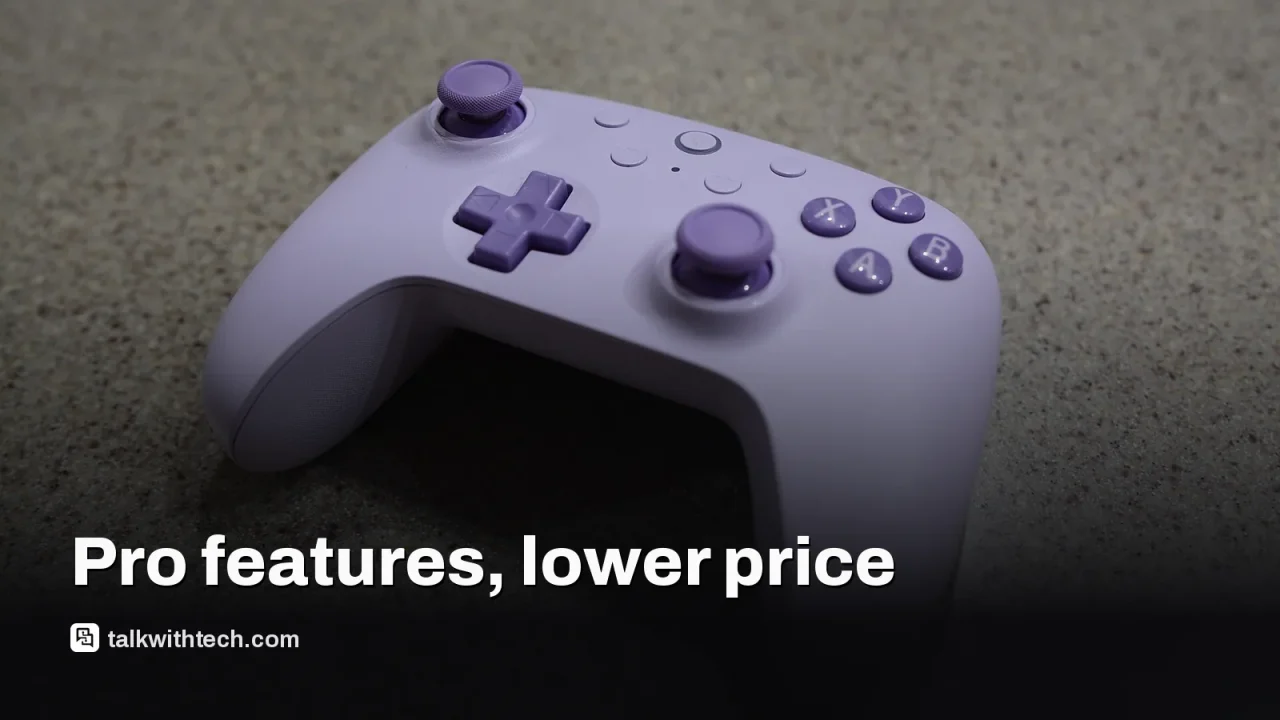
The Ultimate 2 is compact and well balanced, close in size to Nintendo’s Pro Controller, and it suits smaller hands especially well. The plastic shell is smooth, the grips are textured, and hands didn’t slip or cramp over long sessions of Mario Kart World, Resident Evil Requiem and Hello Kitty Island Adventure.
The thumbsticks use TMR sensors, a magnetic design that doesn’t rely on parts that rub and wear out, so they are built to avoid the slow drift that ruins many controllers. The sticks are offset like an Xbox pad and click in easily, even at an angle. Rings of RGB lighting sit around each one, and a small star button on the front cycles the colors.
The triggers use Hall effect sensors, another magnetic design that resists wear, and they feel very smooth. Flip a physical switch and they become short, clicky triggers instead, which helps in shooters. Two extra bumpers, labeled L4 and R4, sit between the usual triggers and shoulder buttons, giving you six shoulder inputs in all, and there are two programmable buttons on the back.
The face buttons have a springy bounce, with shiny domed caps and printed letters. The D-pad is light but has a firm click, good for platformers and fighting games. Rumble strength is adjustable, and motion controls are included for games that use them.
04
The one flaw, and what you give up versus Nintendo
The only real flaw is tiny. Four small round buttons on the front (plus, minus, a square and the star) are low and the same color as the faceplate, so they’re hard to tell apart at a glance. Muscle memory fixes it within a few sessions, and Nintendo’s own Pro Controller has a similar issue.
The bigger trade-offs are features only Nintendo offers. The Pro Controller has a 3.5mm headphone jack, an NFC reader for Amiibo figures and very quiet, soft-feeling sticks. If you plug headphones into your controller or tap Amiibo for in-game rewards, that matters.
In return, the Ultimate 2 gives you things the Pro Controller lacks: the drift-resistant sticks, Hall effect triggers, extra bumpers, the charging dock, RGB lighting, adjustable rumble and full remapping software.
For Switch 2 and the original Switch, you have three options: Bluetooth, the included 2.4G dongle, or a USB-C cable. The dongle gives the most stable link, and in Bluetooth mode a firmware update lets you wake the console from sleep by giving the controller a little shake.
That firmware isn’t installed out of the box, though. To get it, connect the controller to a PC or Mac and use 8BitDo’s free Ultimate Software V2. The same app lets you remap any button, record macros (a string of inputs triggered with one press), set exact light colors and save three custom profiles.
On Windows, the controller works only through the dongle or a cable, not Bluetooth. It also pairs with Android phones, iPhones and the Steam Deck, which makes it a handy all-in-one pad if you play on more than one device.
06
Who should buy the 8BitDo Ultimate 2
For most Switch 2 owners, this is the controller to get. It’s a strong pick if you play long sessions, have smaller hands, want a pad that won’t develop drift, or like to tinker with button layouts and lighting. Families buying an extra controller will appreciate the price and the dock, which means nobody finds it flat on game night.
Stick with Nintendo’s Pro Controller if you use wired headphones through your controller, rely on Amiibo, or prefer the silent sticks. Everyone else saves $20 and gets more features. If you can wait, it’s worth watching for a sale, since the price dips regularly.
07
Quick answers
Does the 8BitDo Ultimate 2 work with Switch 2?
Yes. It connects to Switch 2 and the original Switch over Bluetooth, its included 2.4G dongle or a USB-C cable, and supports motion controls and rumble.
Is it better than the Switch 2 Pro Controller?
For most people, yes. It’s $20 cheaper and adds a dock, drift-resistant sticks and extra buttons, but it lacks the Pro Controller’s headphone jack and Amiibo reader.
Does it support Amiibo?
No. There’s no NFC reader, so you’ll need Nintendo’s Pro Controller or the console itself to scan Amiibo figures.
Rockstar still won't talk frame rates before the November 19 launch. Here's what the footage, the leaks and the hardware actually tell PS5, PS5 Pro and Xbox owners.
A supply-chain leak says Nvidia is rushing a 24GB RTX 5080 for December or January. Here is what's confirmed, what isn't, and what it means for buyers.
5 min read
We use cookies to understand how readers use Talk With Tech, so we can make it better. Is that OK? Privacy policy
The Daily Brief
Today's biggest tech stories, in 5 minutes
Every morning, the news that matters from AI, phones, apps and the people shaping tech. Explained in plain English. Free.
One email a day. No spam, unsubscribe anytime. Privacy policy