Keychron expands lineup as mechanical keyboard trend widens
From the $60 Keychron K2 to wood-bodied and steampunk boards, mechanical keyboards keep pulling in desk workers. Here's what drives the trend and how to pick one.
Mechanical keyboards remain popular with writers and desk workers who care about typing feel, sound and looks.
Keychron, which started on Kickstarter in 2017, now sells dozens of keyboards from the $60 K2 to premium boards.
Newer models use magnetic Hall effect switches, like the K8 HE with a wooden body at around $200.
Rivals such as NuPhy and Ducky offer well-reviewed boards under $100, so a first mechanical keyboard need not cost much.
Quick read · 1 min
Mechanical keyboards keep winning over writers and desk workers who want typing to feel and sound better. Each key has its own spring-loaded switch, the keycaps can be swapped, and the retro look is part of the charm.
Keychron, which began on Kickstarter in 2017, is one of the biggest names. Its compact K2 costs about $60, while newer boards go further: the wood-bodied K8 HE runs about $200 and uses magnetic Hall effect switches, and the wired Q19 HE 8K adds a steampunk metal case. Keychron keeps releasing new models, so the choice keeps widening.
Good starter boards from Keychron, NuPhy and Ducky now cost under $100.
Pick quieter linear or silent switches if you're often on calls.
Choose your size, connection and switch type before you buy.
A $60 keyboard that looks like it came from a 1990s office is still one of the most loved gadgets on a lot of desks. The Keychron K2, a compact mechanical keyboard, has become a default first pick for writers and remote workers, and Keychron has kept expanding the range with wooden, metal and even steampunk-styled models.
Why should you care? If you type for hours a day, your keyboard is the part of your computer you touch most. A good one can make long workdays feel less like a grind, and you don’t need to spend a fortune to find out whether you like the feel.
01
Why the mechanical keyboard trend keeps growing
The appeal is mostly about how typing feels and sounds. In a mechanical keyboard, every key sits on its own small switch with a spring, rather than pressing down on a shared rubber sheet like most laptop and office keyboards. That gives each press a clearer, more satisfying response.
The sound is a big part of the draw too. Some people find the clacking annoying, but plenty of buyers choose a board for exactly that noise, and keyboard typing sounds have become a genre of ASMR videos online.
Fans also point to a few practical perks:
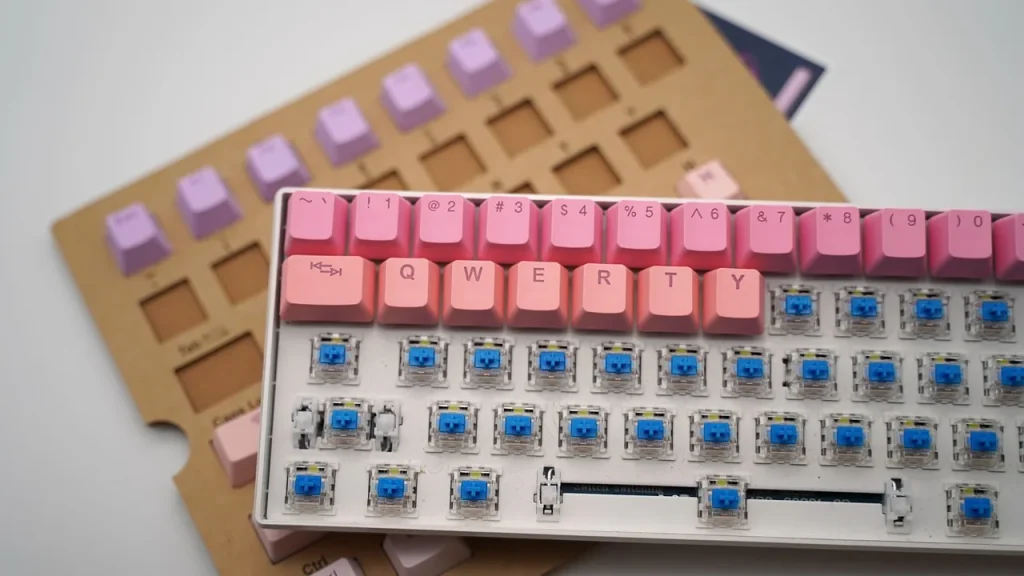
You can swap the keycaps, the plastic tops of the keys, for other sets, and there is a whole side market selling them.
They tend to be durable and easier to repair, since single parts can be replaced.
Setup is simple: unbox it, flip out the tilt legs if you want a better angle, and plug it in.
Then there’s nostalgia. Many of these boards borrow the chunky, workmanlike look of older computers, which stands out next to today’s thin, minimalist gear.
02
How Keychron became the go-to brand
Keychron got its start through a Kickstarter campaign in 2017. Since then it has made dozens of keyboards, plus keypads and mice, and has become one of the best-known names in the hobby. When one tech newsroom recently asked its staff what they type on, Keychron and NuPhy were the brands that came up most.
The K2 is still the entry point. It costs about $60, ships with a USB cable and can also connect over Bluetooth, which is handy if you want fewer wires on your desk. Some owners say its standard switches are on the loud side, so it’s worth checking which switch option you’re buying.
Above the K2, Keychron’s refreshed K, Q and V series mostly sit between about $100 and $200, depending on materials and features. Its high-end Q6 Ultra 8K, a full-size aluminum board, lists at $239.99.
03
Wood, magnets and steampunk: Keychron’s newer models
Keychron’s recent releases lean hard on looks and new switch tech. The K8 HE Wireless Magnetic Switch Custom Keyboard has an all-wood body and LED backlighting, and costs around $200, more than three times the price of a K2.
The HE in that name stands for Hall effect. Instead of a metal contact closing when you press a key, these switches use a magnet and a sensor to measure exactly how far the key has moved. That means you can set how deep a press has to go before it registers, which gamers like for fast reactions.
Keychron has kept adding to that line. In late October it released the Q19 HE 8K, a compact 60% board (one without the number pad, arrow cluster or function row) with a CNC-machined aluminum case in a weathered patina finish, a compass-themed escape key and serif-style key legends. It is wired only, using USB-C, and Keychron’s web app lets you change each key’s actuation point and set up macros.
For gamers there’s also the C0 HE One-Handed 8K Keyboard, a keypad with an industrial look built for speed. It was sold out when it was first highlighted, so availability may vary.
04
What this means for your desk and your wallet
The good news for most people is that a great typing experience is now cheap. Many switches now come pre-lubricated from the factory, so even boards under $100 can sound and feel good straight out of the box. Enthusiasts used to spend hours modding budget boards to get that result.
A few alternatives to Keychron worth knowing:
The NuPhy Node75 lists at $99.95 and is praised for a soft, quiet, cushioned feel and very long battery life.
The Ducky OK-M-98, at $89.99, is a good starter board with hot-swappable keys, though its plastic body feels cheap.
The Wooting 80HE is a premium, wired-only Hall effect board aimed at competitive gamers.
There’s one real downside to consider before you buy. Mechanical keyboards can be loud enough for people on a video call to notice. One editor said colleagues kept asking about the background noise, and he went back to a quieter keyboard. If you take a lot of calls, look for linear or silent switches.
Start with size. A full-size board has a number pad, a tenkeyless board drops it, and compact 65% or 60% layouts save even more desk space by cutting extra keys.
Next, decide on connection. Wired is simplest and has the lowest lag for gaming. Bluetooth or a 2.4GHz wireless receiver keeps your desk tidy and lets you switch between a laptop and a tablet.
Then think about switches. Clicky switches are loud and tactile, linear ones are smooth and quieter, and Hall effect switches let you fine-tune how sensitive each key is. If you can, try a few in a store before you commit, and pick a hot-swappable board so you can change switches later without soldering.
06
Quick answers
Are mechanical keyboards worth it if I’m not a gamer?
For many people who type a lot, yes. The main benefits are a nicer typing feel, durability and the option to customize, and a good starter board costs under $100.
Which Keychron keyboard should I buy first?
The K2 at about $60 is the classic starter pick. If you want magnetic switches or premium materials, the K8 HE and the Q series cost more.
Are mechanical keyboards too loud for an office?
They can be. Choose linear or silent switches, or a gasket-mounted board like the NuPhy Node75, if noise matters.
OpenAI now has two fresh GPT-6.1 models. Sol is the stronger thinker, Terra the fast, cheap worker. Here's how they compare on price, speed, accuracy and access.
OpenAI's CEO called RAM in home computers a poor use of scarce memory. Here is his argument, the numbers behind the shortage, and what it means for your next PC.
You describe what you want in everyday words and an AI writes the code. It's now stripping ads from TVs and building Unreal Engine. Here's where it breaks.
6 min read
We use cookies to understand how readers use Talk With Tech, so we can make it better. Is that OK? Privacy policy
The Daily Brief
Today's biggest tech stories, in 5 minutes
Every morning, the news that matters from AI, phones, apps and the people shaping tech. Explained in plain English. Free.
One email a day. No spam, unsubscribe anytime. Privacy policy
![Play video: Mega tingles mechanical keyboard ASMR - Typing sounds compilation [No Talking] [No Music]](https://i.ytimg.com/vi/p0Ekt2CE2io/hqdefault.jpg)